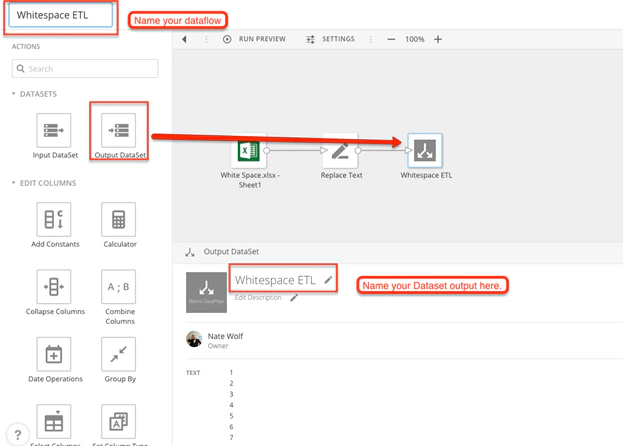
You can use Magic ETL to remove spaces from text strings. To remove spaces from text strings,Documentation Index
Fetch the complete documentation index at: https://domoinc-arun-raj-connetors-domo-480645-add-reports-sort-asc.mintlify.app/llms.txt
Use this file to discover all available pages before exploring further.
- Open Magic ETL.
-
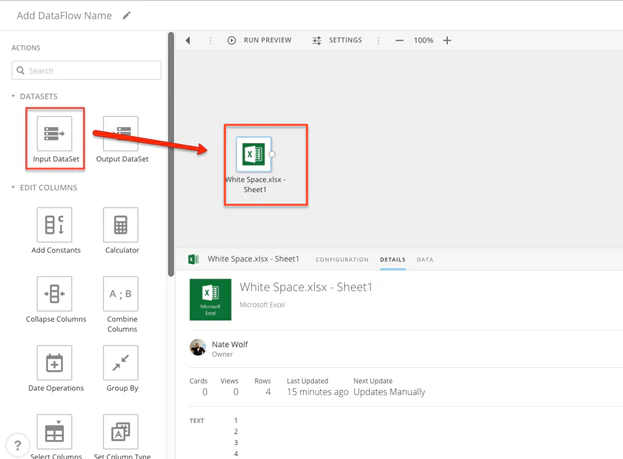
For your input DataSet, select the DataSet you want to remove spaces from.
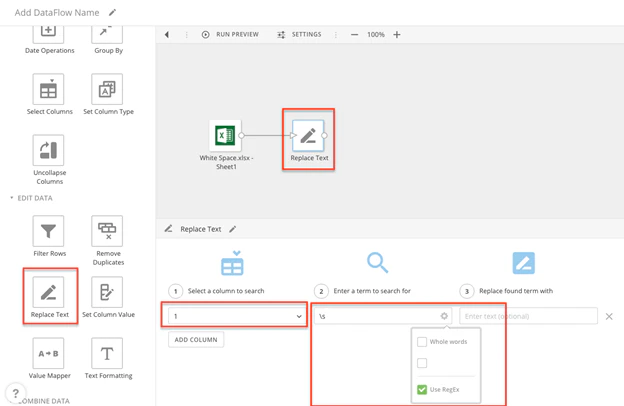
- Add a “Replace Text” tile.
- Under Select a column to search, select the column you want to remove spaces from.
-
Under Enter a term to search for, enter \s.
Note: In RegEx \s is the expression for whitespace.
-
Check the box reading Use RegEx.
- Repeat steps 4-6 for all columns that need to be corrected.
- Click Done.
-
Add an output DataSet and name it.